


Some Good Solid Advice


Data Backup, Some Good Solid Advice
Effective Data Protection for Home Networks and Small Business
For many people, backing up their personal computers and home networks is akin to going to the dentist - people know they need to do it but its often neglected until something bad happens and information is lost. For many consumers, this can be catastrophic as more and more PC hard drives are bulging with digital pictures, music libraries, and personal finance files. For small business the aftermath of a computer crash can be even more dire with loss of customer information and accounts receivable and payable data. Companies have gone out of business as the result of not being able to recover from a catastrophic system crash.
Yet in the face of this sobering fact, it’s widely estimated that more than half of the PCs in homes and small business remain unprotected by regular backups. PC hard drives, though generally reliable, contain many moving parts spinning at up to 10,000rpm, which means eventually they are going to wear out and break.
Like with many things in life, the best offense is a good defense, and in this case, the best defense against catastrophic data loss is to keep your computers backed up regularly. Today there are many solutions and devices available to keep your important information secure, but which one is right for you?
Pros and Cons of Available Storage Technologies
Walking down the storage aisle in electronics stores presents a dizzying array of options for storing the contents of our ever-digital lives. DVD burners, USB flash drives, external hard drives, NAS servers, memory cards….and “the cloud”, commonly referred to as online storage. But which storage technology is best for you? CD & DVD burners were once the de-facto backup media back in the early 90’s because nobody thought you’d ever need more than 4.7GB of storage. Just like the designers of the first home © 2009 Proxure, Inc. All rights reserved Capacity LimitConnectivityPortabilityCostBackup EffectivenessTech SavvyDurabilityInternal Hard DrivesHigh, depending how many bays available in your computerTypically SATA or IDENoneLow cost per GBProvides continuous backup ability, but high risk of loss to fire, damage, or theftModerate, requires some tech skills to open PC to installLow - mechanical failure likely after just a few yearsExternal Hard DrivesHighTypically high speed USB or Firewire InterfaceUsually very portable or at least luggableReasonable low cost per GBProvides continuous backup ability if connected, portability means it can be taken off-siteEasy installation, typically plug-and-playLow - mechanical failure likely after just a few yearsUSB Flash DrivesLow, typically 8GB or lessHigh Speed USBExtremely portableHigh cost per GBIdeal for small, critical files, or backup for individual projectsEasy installation, typically plug-and-playModerate - Flash memory is stable, rugged/waterproof units availableNetworked Attached Storage (NAS)Very High, some models expandable with more drivesEthernet, connects to home or office networkNoneModerate cost per GBMulti-drive units provide network-wide backup and high redundancy if RAID is implementedEasy for basic installation, moderate for some optionsModerate - multiple hard drives give redundancyCD/DVD/Blu-rayLow, under 50GB for dual layer Blu-rayTypically SATA for internal drive, high speed USB for external drivePossible if external drive purchasedHigh cost per GBCapacity very limiting for regular backup or file storage, but good permanent archive solutionModerate, requires some tech skills to open PC to install, easy if external driveLong media life, 30+ years if stored correctlyOnline StorageVariable and scalable depending on needsAccess via InternetDoes not applyLow cost per GBVery effective off-site backup especially if used in conjuction with local backup Easy, sign-up typically just a few mouse clicksVery high, online storage companies provide backup of stored information
computers never thought you’d ever need more than 640Kb of memory, this has proven to be a very short-sighted view. The explosion of digital cameras with 10+ megapixels, huge ripped video files, and the ease of purchasing music online; coupled with the availability of 6Mbit & 12Mbit cable & DSL home networks, the need for storage space has expanded ten-fold in just the past couple of years.
The reality today is that for many people, CDs & DVDs are really back to being playback technologies for the home or car, but not for general storage as their capacity is too limiting now. CDs & DVDs, and even new recordable Blu-ray Discs do still serve well in one important storage application: archiving. Write-Once CD-R, DVD+R, and BD-R discs cannot be over-written so they are good for archiving documents, emails, and information that needs to be saved permanently.
Internal Hard Drives - Many PCs can be expanded with additional internal hard drives, which are becoming very inexpensive and offer very large capacities. Not everyone will be technically savvy enough to open their PC case or laptop to add a second drive or replace the existing drive with a larger one. The other big consideration is that if there is a fire, flood, or the computer is lost or stolen, the backup saved on an internal drive is likely to be lost along with the computer.
External Hard Drives - Like internal hard drives, external ones have become fairly inexpensive and have very large capacities. External drives have the benefit of being able to back up multiple PCs as it can be plugged into each computer in turn to back it up, and in an emergency they are generally small enough to slip into a bag and take with you.
USB Flash Drives - The good ole’ USB thumb drive is great for backing up or storing small amounts of information as they generally are low capacity (8GB ~ 32GB), hardly enough for even most music or digital picture libraries, not to mention videos. Their small size makes them convenient but also more susceptible to get lost. If you store important files on a USB flash drive, get one with encryption or at least password protection so that in the event the drive is lost, the data will be safe.
Network Attached Storage (NAS)/Windows Home Servers - NAS servers, while intimidating sounding, are actually fairly straightforward to install and use. Basically, a NAS is really just one or more hard drives in an external box, connected to your home/office network through the wired or wireless router. Once installed, everyone on the network can access the NAS drive to store or retrieve information. NAS drives are good backup solutions because they often include RAID (Redundant Array of Inexpensive Discs) which is a highly effective technology that spreads data over several hard drives to protect against any one of them failing and wiping out everything.
Another example of the NAS concept is a Windows Home Server (WHS), which is essentially a PC with hard drives and the Microsoft Windows Home Server software, which allows users to centrally share music, video, photos and documents, record TV shows, and much more. When connected to your home (or small office) network, a WHS facilitates easy sharing and even backing up all your digital content to a central place.
CD/DVD/Blu-ray Disc - As previously explained, optical discs, while good for playback of music & video and long term archiving, isn’t a great choice for general storage or daily/weekly backups as they just don’t store much (680MB for CD, 4.7/8.5GB for DVD/double layer DVD, or 25/50GB for Blu-ray/dual layer Blu-ray).
Online Storage - The big hard drive in “the cloud” is fast becoming popular as it stores your information over the Internet/Intranet on a server “offsite” so a fire, flood, or other disaster won’t affect the backed up information. The big benefit is that if your hard drive crashes or the building burns down, the online backup can be restored to a new hard drive/computer and everything that was backed up can be recovered.
Clearly, online storage is one of the better choices to store important information but even it has some caveats, including typically a monthly or annual subscription to be paid and depending on the speed of your network, uploading or downloading large amounts of information can take some time.
In reality, the most effective data protection strategy likely involves two storage technologies, one local such as an external hard drive or a NAS/WHS server, coupled with online backup for maximum redundancy of really critical information.
Now that you have a better handle on what some of the available storage technologies are, there is the often over-looked backup software that is really the heart of your backup. One such backup software is Proxure’s KeepVault™, which manages your recurring backup once a few simple options are set. KeepVault utilizes both online and local backups of your digital world to keep the important stuff protected and available so in the event of a catastrophe, you can get everything back.
KeepVault utilizes Proxure’s high performance scalable storage servers for online backup as it offers fast, secure online storage that is very economical. In common terms, we often refer to this online storage as a “bucket”. Most of the time, an online backup provider such as Carbonite, Mozy, and others will sell you 1GB or more of online storage for a monthly fee….but it’s limited to a single computer. In this day of home networks having an average of 3 computers or more, and 5 ~ 10 for typical small businesses; this type of scheme doesn’t work. One of the key features of KeepVault and the online storage bucket it provides is that the software can be installed on as many Windows PCs or Windows Home Servers in your home or office and the storage bucket can be shared by all the computers in your network.
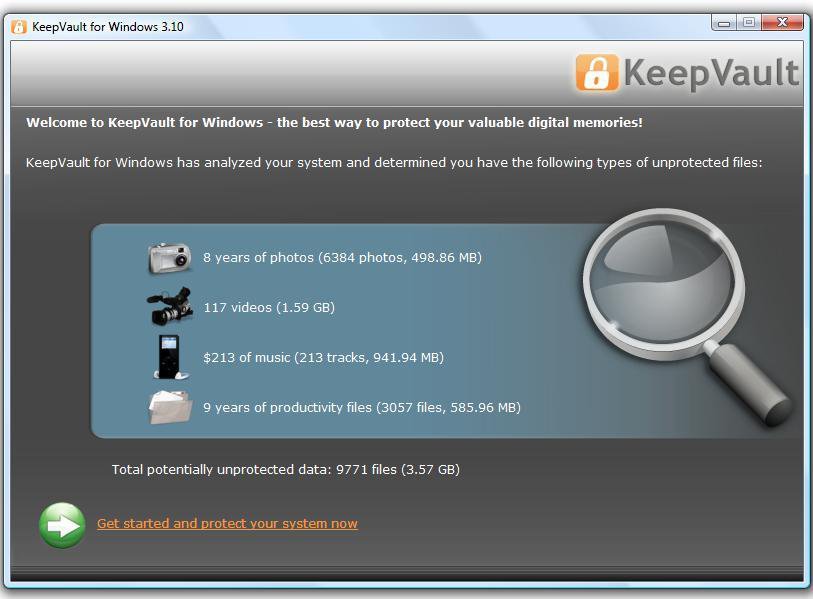
KeepVault quickly analyzes your computer and gives you a snap-shot of the un-protected content that is at risk if a catastrophe happens. Total files and capacity is outlined for each file type, and even the value of purchased music content is calculated.
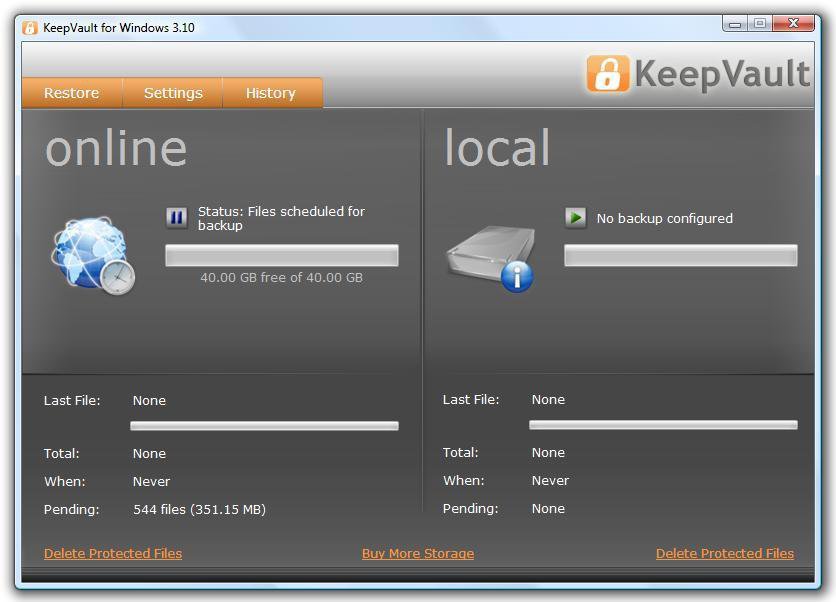
With just a few mouse clicks, you can easily set up online and local backups of your digital pictures, music, videos, and documents. The basic KeepVault package includes 40GB on online storage, and the software can be installed on as many Windows PC’s you have in your network to share the online storage account. The Windows Vista/XP/Windows 7 version of KeepVault supports local backups to USB flash drives or internal/external hard drives. The online storage capacity can be easily expanded as your storage needs grow.
There is also a Windows Home Server version of KeepVault that starts with the same 40GB online storage account but is limited to a single Windows Home Server.
Backup Strategies for Home Networks
Now that you’re armed with some learning on storage technologies and the power of Proxure’s KeepVault backup software, let’s blueprint a real-world backup scenario for protecting a home network with 3 computers sharing a single Internet connection via a wireless router. In this particular home network, the family is sharing an iTunes library located on “Dad’s” computer, along with the family’s financial information. “Mom’s” computer, however, has several thousand digital pictures from family vacations and events. The “Kid’s” computer has many videos that have been downloaded as well as pictures from his cell phone. In this scenario, a basic KeepVault setup with 40GB of online storage is more than sufficient for the family’s needs. The KeepVault software is downloaded and installed on all 3 PC’s, and the shared online storage account can be configured to backup the contents of the 3 computers every Friday at 12am, when the computers are not in use, or it can be set for continuous, real time backup. Additionally, on “Dad’s” PC, the financial information is backed up locally on a USB flash drive to have access to the backup quickly in case of a hard drive crash.
Another home scenario that could come into play is if there is a Windows Home Server (WHS) installed in the home. In this case, depending on how much content is being stored on the WHS, the 40GB basic online storage account might not be enough if there are lots of video content, which is no problem as the WHS version of the KeepVault software’s online storage account can be easily expanded. Note that the WHS version of KeepVault protects the contents of a single Windows Home Server. Users connected to the server should have accounts on the server to store important files/folders that they want backed up.
Tip: It helps to keep your content organized. People have a tendency to lump all their digital pictures into the My Pictures folder without organizing them in a way they can © 2009 Proxure, Inc. All rights reserved
easily find them. For some good tips and tricks to keeping all your digital content organized, check out the book Organize Your Digital Life by Aimee Baldridge.
Backup Strategies for Small/Medium Business
Certainly business owners know the importance of keeping their data backed up. A hard drive crash on the PC running the accounting software could be catastrophic to the business if it’s not backed up. The business owner could find themselves in the position of not knowing who owes them money, or who they owe money to.
A professional version of KeepVault can back up critical information on each PC to a shared, scalable online storage account starting at 40GB of online capacity with NO bandwidth throttling. Enable KeepVault’s encryption option for local backups so that in the event a drive is lost or compromised, the data will be gibberish without the password. Consider backing up locally to a NAS server with RAID implemented. The size of NAS server required will depend on how much data is needed to be backed up. Two or four drive NAS servers are most likely perfect as you can expect between 1TB and 5TB of capacity with very high transfer rates. Implement RAID 1 with a two drive NAS, or RAID 5 with a four (or higher) drive NAS as this gives maximum data redundancy.
Resources Area
In this section, we’ve compiled some resources to help you research and choose the best local backup storage products to fit your needs and tips for keeping your content organized.
Check out KeepVault - www.keepvault.com
Organize your digital life - by Aimee Baldridge. Published by National Geographic, this book will give you simple, down to earth tips & tricks for keeping your digital content organized and protected.
Hard Drive Manufacturers - check out internal and external hard drives from these top brands:
Seagate Technology - www.seagate.com
Western Digital - www.westerndigital.com
Verbatim - www.verbatim.com © 2009 Proxure, Inc. All rights reserved
USB Flash Drive Manufacturers - Top brands of USB thumb drives:
Kingston - www.kingston.com
Lexar - www.lexar.com
PNY - www.pny.com
SanDisk - www.sandisk.com
Verbatim - www.verbatim.com
NAS Server Manufacturers - Some of the best NAS server brands:
Buffalo Technology - www.buffalotech.com (sells complete ready-NAS systems)
QNAP - www.qnap.com (sells NAS servers without drives, super high performance)
Glossary of Terms
Local Backup - A backup of files & folders from a PC which is stored “locally” on an internal/external hard drive, USB flash drive, NAS server, CD/DVD/Blu-ray Disc, or other storage technology connected directly to the PC or over the local network.
Online Backup - A backup of files and folders from a PC which is stored redundantly “offsite” on a remote server over the Internet or Intranet.
RAID - Redundant Array of Inexpensive Discs; which is typically implemented on a NAS server with 2 or more drives. There are several RAID “levels” from RAID 0, 1, 3, 5, 6, and 5+ Spare. The higher the RAID level, the higher the data redundancy. For example, RAID 0 (data striping)
WHS - Windows Home Server; which in a nutshell is Microsoft’s vision of the future of home networking and content sharing within the home. Built on the Windows 2003 architecture, WHS provides the framework to store, play, and share digital content such as music, photos, and video
About Proxure, Inc.
Founded in 2005 and headquartered in San Luis Obispo CA, Proxure, Inc. specializes in developing revolutionary new technologies for information storage, backup, and synchronization. With over 50 years of collective experience in data storage technology from companies including Veritas, Roxio, and Sonic Solutions, the Proxure development team has released intriguing products including KeepSync™(patent pending), KeepVault™, and filmaroo™ applications. www.proxure.com
For many people, backing up their personal computers and home networks is akin to going to the dentist - people know they need to do it but its often neglected until something bad happens and information is lost. For many consumers, this can be catastrophic as more and more PC hard drives are bulging with digital pictures, music libraries, and personal finance files. For small business the aftermath of a computer crash can be even more dire with loss of customer information and accounts receivable and payable data. Companies have gone out of business as the result of not being able to recover from a catastrophic system crash.
Yet in the face of this sobering fact, it’s widely estimated that more than half of the PCs in homes and small business remain unprotected by regular backups. PC hard drives, though generally reliable, contain many moving parts spinning at up to 10,000rpm, which means eventually they are going to wear out and break.
Like with many things in life, the best offense is a good defense, and in this case, the best defense against catastrophic data loss is to keep your computers backed up regularly. Today there are many solutions and devices available to keep your important information secure, but which one is right for you?
Pros and Cons of Available Storage Technologies
Walking down the storage aisle in electronics stores presents a dizzying array of options for storing the contents of our ever-digital lives. DVD burners, USB flash drives, external hard drives, NAS servers, memory cards….and “the cloud”, commonly referred to as online storage. But which storage technology is best for you? CD & DVD burners were once the de-facto backup media back in the early 90’s because nobody thought you’d ever need more than 4.7GB of storage. Just like the designers of the first home © 2009 Proxure, Inc. All rights reserved Capacity LimitConnectivityPortabilityCostBackup EffectivenessTech SavvyDurabilityInternal Hard DrivesHigh, depending how many bays available in your computerTypically SATA or IDENoneLow cost per GBProvides continuous backup ability, but high risk of loss to fire, damage, or theftModerate, requires some tech skills to open PC to installLow - mechanical failure likely after just a few yearsExternal Hard DrivesHighTypically high speed USB or Firewire InterfaceUsually very portable or at least luggableReasonable low cost per GBProvides continuous backup ability if connected, portability means it can be taken off-siteEasy installation, typically plug-and-playLow - mechanical failure likely after just a few yearsUSB Flash DrivesLow, typically 8GB or lessHigh Speed USBExtremely portableHigh cost per GBIdeal for small, critical files, or backup for individual projectsEasy installation, typically plug-and-playModerate - Flash memory is stable, rugged/waterproof units availableNetworked Attached Storage (NAS)Very High, some models expandable with more drivesEthernet, connects to home or office networkNoneModerate cost per GBMulti-drive units provide network-wide backup and high redundancy if RAID is implementedEasy for basic installation, moderate for some optionsModerate - multiple hard drives give redundancyCD/DVD/Blu-rayLow, under 50GB for dual layer Blu-rayTypically SATA for internal drive, high speed USB for external drivePossible if external drive purchasedHigh cost per GBCapacity very limiting for regular backup or file storage, but good permanent archive solutionModerate, requires some tech skills to open PC to install, easy if external driveLong media life, 30+ years if stored correctlyOnline StorageVariable and scalable depending on needsAccess via InternetDoes not applyLow cost per GBVery effective off-site backup especially if used in conjuction with local backup Easy, sign-up typically just a few mouse clicksVery high, online storage companies provide backup of stored information
computers never thought you’d ever need more than 640Kb of memory, this has proven to be a very short-sighted view. The explosion of digital cameras with 10+ megapixels, huge ripped video files, and the ease of purchasing music online; coupled with the availability of 6Mbit & 12Mbit cable & DSL home networks, the need for storage space has expanded ten-fold in just the past couple of years.
The reality today is that for many people, CDs & DVDs are really back to being playback technologies for the home or car, but not for general storage as their capacity is too limiting now. CDs & DVDs, and even new recordable Blu-ray Discs do still serve well in one important storage application: archiving. Write-Once CD-R, DVD+R, and BD-R discs cannot be over-written so they are good for archiving documents, emails, and information that needs to be saved permanently.
Internal Hard Drives - Many PCs can be expanded with additional internal hard drives, which are becoming very inexpensive and offer very large capacities. Not everyone will be technically savvy enough to open their PC case or laptop to add a second drive or replace the existing drive with a larger one. The other big consideration is that if there is a fire, flood, or the computer is lost or stolen, the backup saved on an internal drive is likely to be lost along with the computer.
External Hard Drives - Like internal hard drives, external ones have become fairly inexpensive and have very large capacities. External drives have the benefit of being able to back up multiple PCs as it can be plugged into each computer in turn to back it up, and in an emergency they are generally small enough to slip into a bag and take with you.
USB Flash Drives - The good ole’ USB thumb drive is great for backing up or storing small amounts of information as they generally are low capacity (8GB ~ 32GB), hardly enough for even most music or digital picture libraries, not to mention videos. Their small size makes them convenient but also more susceptible to get lost. If you store important files on a USB flash drive, get one with encryption or at least password protection so that in the event the drive is lost, the data will be safe.
Network Attached Storage (NAS)/Windows Home Servers - NAS servers, while intimidating sounding, are actually fairly straightforward to install and use. Basically, a NAS is really just one or more hard drives in an external box, connected to your home/office network through the wired or wireless router. Once installed, everyone on the network can access the NAS drive to store or retrieve information. NAS drives are good backup solutions because they often include RAID (Redundant Array of Inexpensive Discs) which is a highly effective technology that spreads data over several hard drives to protect against any one of them failing and wiping out everything.
Another example of the NAS concept is a Windows Home Server (WHS), which is essentially a PC with hard drives and the Microsoft Windows Home Server software, which allows users to centrally share music, video, photos and documents, record TV shows, and much more. When connected to your home (or small office) network, a WHS facilitates easy sharing and even backing up all your digital content to a central place.
CD/DVD/Blu-ray Disc - As previously explained, optical discs, while good for playback of music & video and long term archiving, isn’t a great choice for general storage or daily/weekly backups as they just don’t store much (680MB for CD, 4.7/8.5GB for DVD/double layer DVD, or 25/50GB for Blu-ray/dual layer Blu-ray).
Online Storage - The big hard drive in “the cloud” is fast becoming popular as it stores your information over the Internet/Intranet on a server “offsite” so a fire, flood, or other disaster won’t affect the backed up information. The big benefit is that if your hard drive crashes or the building burns down, the online backup can be restored to a new hard drive/computer and everything that was backed up can be recovered.
Clearly, online storage is one of the better choices to store important information but even it has some caveats, including typically a monthly or annual subscription to be paid and depending on the speed of your network, uploading or downloading large amounts of information can take some time.
In reality, the most effective data protection strategy likely involves two storage technologies, one local such as an external hard drive or a NAS/WHS server, coupled with online backup for maximum redundancy of really critical information.
Now that you have a better handle on what some of the available storage technologies are, there is the often over-looked backup software that is really the heart of your backup. One such backup software is Proxure’s KeepVault™, which manages your recurring backup once a few simple options are set. KeepVault utilizes both online and local backups of your digital world to keep the important stuff protected and available so in the event of a catastrophe, you can get everything back.
KeepVault utilizes Proxure’s high performance scalable storage servers for online backup as it offers fast, secure online storage that is very economical. In common terms, we often refer to this online storage as a “bucket”. Most of the time, an online backup provider such as Carbonite, Mozy, and others will sell you 1GB or more of online storage for a monthly fee….but it’s limited to a single computer. In this day of home networks having an average of 3 computers or more, and 5 ~ 10 for typical small businesses; this type of scheme doesn’t work. One of the key features of KeepVault and the online storage bucket it provides is that the software can be installed on as many Windows PCs or Windows Home Servers in your home or office and the storage bucket can be shared by all the computers in your network.
KeepVault quickly analyzes your computer and gives you a snap-shot of the un-protected content that is at risk if a catastrophe happens. Total files and capacity is outlined for each file type, and even the value of purchased music content is calculated.
With just a few mouse clicks, you can easily set up online and local backups of your digital pictures, music, videos, and documents. The basic KeepVault package includes 40GB on online storage, and the software can be installed on as many Windows PC’s you have in your network to share the online storage account. The Windows Vista/XP/Windows 7 version of KeepVault supports local backups to USB flash drives or internal/external hard drives. The online storage capacity can be easily expanded as your storage needs grow.
There is also a Windows Home Server version of KeepVault that starts with the same 40GB online storage account but is limited to a single Windows Home Server.
Backup Strategies for Home Networks
Now that you’re armed with some learning on storage technologies and the power of Proxure’s KeepVault backup software, let’s blueprint a real-world backup scenario for protecting a home network with 3 computers sharing a single Internet connection via a wireless router. In this particular home network, the family is sharing an iTunes library located on “Dad’s” computer, along with the family’s financial information. “Mom’s” computer, however, has several thousand digital pictures from family vacations and events. The “Kid’s” computer has many videos that have been downloaded as well as pictures from his cell phone. In this scenario, a basic KeepVault setup with 40GB of online storage is more than sufficient for the family’s needs. The KeepVault software is downloaded and installed on all 3 PC’s, and the shared online storage account can be configured to backup the contents of the 3 computers every Friday at 12am, when the computers are not in use, or it can be set for continuous, real time backup. Additionally, on “Dad’s” PC, the financial information is backed up locally on a USB flash drive to have access to the backup quickly in case of a hard drive crash.
Another home scenario that could come into play is if there is a Windows Home Server (WHS) installed in the home. In this case, depending on how much content is being stored on the WHS, the 40GB basic online storage account might not be enough if there are lots of video content, which is no problem as the WHS version of the KeepVault software’s online storage account can be easily expanded. Note that the WHS version of KeepVault protects the contents of a single Windows Home Server. Users connected to the server should have accounts on the server to store important files/folders that they want backed up.
Tip: It helps to keep your content organized. People have a tendency to lump all their digital pictures into the My Pictures folder without organizing them in a way they can © 2009 Proxure, Inc. All rights reserved
easily find them. For some good tips and tricks to keeping all your digital content organized, check out the book Organize Your Digital Life by Aimee Baldridge.
Backup Strategies for Small/Medium Business
Certainly business owners know the importance of keeping their data backed up. A hard drive crash on the PC running the accounting software could be catastrophic to the business if it’s not backed up. The business owner could find themselves in the position of not knowing who owes them money, or who they owe money to.
A professional version of KeepVault can back up critical information on each PC to a shared, scalable online storage account starting at 40GB of online capacity with NO bandwidth throttling. Enable KeepVault’s encryption option for local backups so that in the event a drive is lost or compromised, the data will be gibberish without the password. Consider backing up locally to a NAS server with RAID implemented. The size of NAS server required will depend on how much data is needed to be backed up. Two or four drive NAS servers are most likely perfect as you can expect between 1TB and 5TB of capacity with very high transfer rates. Implement RAID 1 with a two drive NAS, or RAID 5 with a four (or higher) drive NAS as this gives maximum data redundancy.
Resources Area
In this section, we’ve compiled some resources to help you research and choose the best local backup storage products to fit your needs and tips for keeping your content organized.
Check out KeepVault - www.keepvault.com
Organize your digital life - by Aimee Baldridge. Published by National Geographic, this book will give you simple, down to earth tips & tricks for keeping your digital content organized and protected.
Hard Drive Manufacturers - check out internal and external hard drives from these top brands:
Seagate Technology - www.seagate.com
Western Digital - www.westerndigital.com
Verbatim - www.verbatim.com © 2009 Proxure, Inc. All rights reserved
USB Flash Drive Manufacturers - Top brands of USB thumb drives:
Kingston - www.kingston.com
Lexar - www.lexar.com
PNY - www.pny.com
SanDisk - www.sandisk.com
Verbatim - www.verbatim.com
NAS Server Manufacturers - Some of the best NAS server brands:
Buffalo Technology - www.buffalotech.com (sells complete ready-NAS systems)
QNAP - www.qnap.com (sells NAS servers without drives, super high performance)
Glossary of Terms
Local Backup - A backup of files & folders from a PC which is stored “locally” on an internal/external hard drive, USB flash drive, NAS server, CD/DVD/Blu-ray Disc, or other storage technology connected directly to the PC or over the local network.
Online Backup - A backup of files and folders from a PC which is stored redundantly “offsite” on a remote server over the Internet or Intranet.
RAID - Redundant Array of Inexpensive Discs; which is typically implemented on a NAS server with 2 or more drives. There are several RAID “levels” from RAID 0, 1, 3, 5, 6, and 5+ Spare. The higher the RAID level, the higher the data redundancy. For example, RAID 0 (data striping)
WHS - Windows Home Server; which in a nutshell is Microsoft’s vision of the future of home networking and content sharing within the home. Built on the Windows 2003 architecture, WHS provides the framework to store, play, and share digital content such as music, photos, and video
About Proxure, Inc.
Founded in 2005 and headquartered in San Luis Obispo CA, Proxure, Inc. specializes in developing revolutionary new technologies for information storage, backup, and synchronization. With over 50 years of collective experience in data storage technology from companies including Veritas, Roxio, and Sonic Solutions, the Proxure development team has released intriguing products including KeepSync™(patent pending), KeepVault™, and filmaroo™ applications. www.proxure.com


Home



|
|




Click to enlarge
Click to enlarge